Loading…

Recommended Articles
Loading…
Last Updated on Sep 21, 2016
If you have regular conference calls with your Thinkster coach, then you’ve likely heard them mention again and again the importance of your child checking the teacher solutions and corrections. So where exactly do you find these teacher solutions and why is it so important that your child checks these regularly?
We don’t mind when your child makes mistakes in their Thinkster work. Mistakes in math are an opportunity to learn. However, if your child repeats the same worksheet or the same topic over and over again without looking at their coach’s feedback and the teacher solutions, they are missing out on the chance to master that topic quickly.
Child 1 – completes the worksheet and makes some mistakes. The next day, before trying that worksheet or that topic again, they check the teacher solutions and corrections and see where they made mistakes. They then try that worksheet/topic again, getting much better results this time and are able to move on to another topic or worksheet.
Child 2 – Completes the worksheets and makes some mistakes. They then attempt the same worksheet or topic again without having looked at the teacher solutions or corrections. As a result, they make the same mistakes again because they didn’t fully understand the topic and they repeat the worksheet/topic again and again without learning from their mistakes.
Child 1 will make much faster progress through the Thinkster program
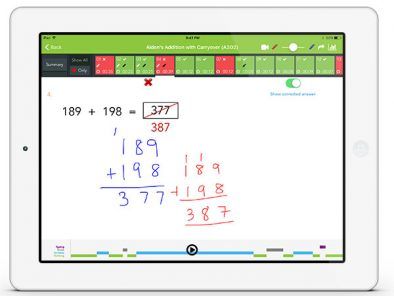
Bonus Tip: Some students keep a notebook where they copy corrections and solutions to tricky questions.
Try making the review process a regular part of your child’s Thinkster routine. Even if they only review their corrections once a week or so, they’ll soon see the difference it makes to their overall progress through the grade.
Compare Kumon, Mathnasium & Thinkster side by side: teaching methods, ...
Online vs in-person tutoring: Honest comparison of cost, flexibility, ...
3rd grade math struggles with place value and word problems? Here's ho...